# Shared Tree Shaking
## Background
When using Module Federation (MF), we often share common dependencies (such as antd, React, etc.) through the `shared` configuration to reduce duplicate bundling and keep dependency versions consistent across applications. However, the classic `shared` mechanism has a downside: it always provides the **full** dependency bundle, even if your application only uses a small portion of it (for example, only the `Button` component from antd).
This can lead to:
- **Large build artifacts**: unnecessary code is bundled, increasing the final output size.
- **Runtime overhead**: the browser downloads and executes more JavaScript than needed, slowing down page load and render.
**Shared Tree Shaking** is designed to solve this. It analyzes your code, precisely identifies which exports are actually used, and bundles only that subset. As a result, your application can consume an optimized, smaller shared dependency.
:::tip Key Benefits
- **Smaller output size**: reduces unnecessary code at the source.
- **Faster loading**: users download only what they need.
- **Better runtime performance**: less JavaScript to parse and execute.
:::
## Quick Start
Enabling Shared Tree Shaking is straightforward: add the `treeShaking` option in your configuration.
### Example
```ts title="rspack.config.ts"
export default {
// ...
plugins: [
new ModuleFederationPlugin({
// ...
shared: {
antd: {
treeShaking: { mode: 'runtime-infer' },
},
},
}),
],
};
```
### Local verification
After building locally, check the output size and the exported content of the shared dependency (e.g. antd). The expected result is that it only contains the modules you actually use.
## Configuration
The core option is [sharedItem.treeShaking](/configure/shared.md#treeshaking). You can also control where Tree Shaking artifacts are generated via:
- [treeShakingDir](/configure/treeShakingDir.md)
- [injectTreeShakingUsedExports](/configure/injectTreeShakingUsedExports.md)
- [treeShakingSharedPlugins](/configure/treeShakingSharedPlugins.md)
- [treeShakingSharedExcludePlugins](/configure/treeShakingSharedExcludePlugins.md)
## Modes
There are two modes to fit different team setups and project scales.
### runtime-infer
`runtime-infer` is a lightweight strategy that does not require a centralized service.
- **Enable**: set `mode` to `runtime-infer`.
- **Best for**:
- local development and quick validation,
- teams without a deployment or CI service,
- smaller projects with a single consumer.
- **How it works**: at runtime, if the current page’s needs are already satisfied by a previously loaded, tree-shaken shared bundle, it reuses it. Otherwise, it **falls back to loading the full dependency bundle** to ensure correctness.
- **Improving hit rate**: without a global view, the reuse rate of `runtime-infer` may be limited. You can manually augment the `usedExports` list in your configuration to pre-declare modules you may need, guiding the compiler to generate a more suitable shared bundle and improving reuse.
### server-calc
`server-calc` is the **strongly recommended best practice**. It leverages a centralized service to maximize the benefits of Tree Shaking and achieve a global optimum.
{!props.name && (
<CreateSharedTreeShakingDeployServer />
)}
## Validation and rollback
### How to confirm Tree Shaking is working?
1. **Network panel check**: in the browser DevTools Network panel, filter loaded JS files. Confirm the loaded file is the secondary build artifact (typically containing identifiers like `secondary` or a hash) rather than the original full bundle. Its size should be significantly smaller.
2. **Inspect bundle contents**: download the loaded shared dependency JS file and search for exports you **did not use** (e.g. you only used `Button`, so search for `Modal`). If they’re not present, they were successfully shaken out.
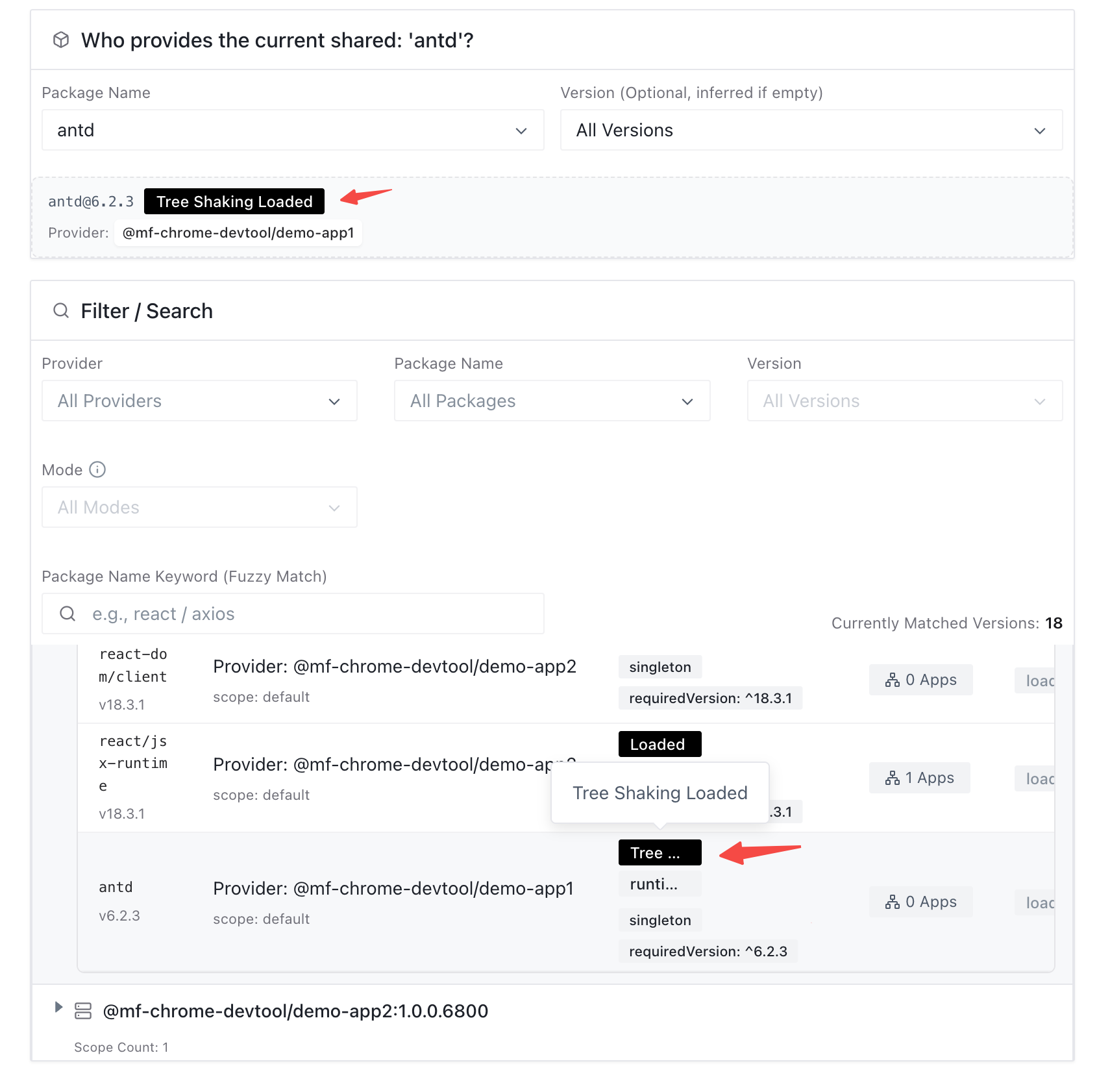
3. **Chrome DevTools verification**: in Chrome DevTools, open the “Shared” panel and select the target shared dependency. Check its status tags: `Tree Shaking Loaded` means Tree Shaking is effective and the trimmed artifact is loaded; `Loaded` means it fell back to loading the full bundle; `Tree Shaking Loading` means it’s loading via the Tree Shaking path.
### How to safely roll back?
Shared dependency Tree Shaking is designed with an **automatic safe fallback**. If the runtime detects issues (Snapshot not delivered, network errors, version mismatch, etc.), it defaults to loading the full shared dependency bundle to keep the application stable.
If you need to disable it manually, stop the secondary-build and Snapshot-update steps in your deployment service.
{props.secondaryBuild || React.createElement(SecondaryBuild)}
## FAQ
**1. Can Shared Tree Shaking be used with `eager: true`?**
**No.** `eager: true` bundles shared dependencies into the initial chunk, which conflicts with the on-demand loading model required by Tree Shaking. You must choose between them:
- If the shared dependency is small and you want the fastest possible initial load, consider `eager: true`.
- If the shared dependency is large (e.g. a component library), **disable `eager`** and use Tree Shaking for significant size and performance gains.
**2. What should I watch out for with singleton dependencies in `runtime-infer`?**
Be careful. If a shared dependency is configured as `singleton: true` (must be globally singleton), you may hit scenarios like:
- App A uses only `antd/Button` and loads its own tree-shaken bundle.
- App B uses `antd/Modal` and loads its own full bundle.
This can result in two different antd instances on the same page (a minimal one and a full one). That breaks the singleton constraint and may cause style conflicts, non-shared state, or even crashes.
**Recommendation**: for libraries that must remain singleton, prefer **`server-calc`** so all consumers load the same globally optimized bundle. If you must use `runtime-infer`, expand `usedExports` to make the produced bundle more complete and reduce the risk of conflicts.
**3. What are the prerequisites for Tree Shaking to work?**
It primarily depends on the bundler’s static analysis. Your code must use ES Modules (`import`/`export`) so the compiler can determine which exports are used. CommonJS (`require`/`module.exports`) modules typically cannot be tree-shaken effectively.
**4. Will this break shared dependencies for already released projects?**
**No.** The data source and loading path for Tree Shaking are isolated from the existing shared mechanism, and there are strict hit conditions and safe fallback behavior. It does not affect stable legacy projects.
## Further reading
- [How Shared Dependency Tree Shaking Works](https://github.com/module-federation/core/discussions/4302)

