

# 远程模块渲染错误处理方案
:::tip 版本要求
此方案需要升级 `@module-federation/runtime` 版本至 0.8.10 或以上版本
:::
## 背景
远程模块加载过程可能会因网络资源加载失败或自身业务逻辑渲染失败等因素造成远程模块加载失败。
虽然 Module Federation Runtime 在此过程中提供了尽可能详细的错误日志信息及 runtime hook 来帮助用户定位加载失败的原因,但是更多的我们需要针对此类不可控因素增加错误兜底机制以保证整个站点的稳定性,防止因某个远程模块渲染失败导致整个站点崩溃。
## 解决方案
为了构建一个健壮的远程模块加载机制,我们可以从以下三个层面来处理可能出现的问题:
> 以下解决方案均可参考 [router-demo](https://github.com/module-federation/core/tree/main/apps/router-demo) 中示例。
### 网络层:重试机制
使用 [`@module-federation/retry-plugin`](https://module-federation.io/zh/plugin/plugins/retry-plugin.html) 插件来处理网络相关的问题:
- 自动重试失败的资源请求
- 可配置重试次数和间隔时间
- 支持自定义错误处理策略
### 加载层:错误处理钩子
利用 Module Federation Runtime 提供的 [`errorLoadRemote`](https://module-federation.io/zh/plugin/dev/index.html#errorloadremote) hook 进行更细粒度的错误处理:
- 在不同的加载生命周期捕获错误
- 提供兜底组件或备用资源
- 支持自定义错误处理策略
### 渲染层:错误边界
通过 React 的 `ErrorBoundary` 机制来处理组件渲染时的异常:
- 优雅降级,显示友好的错误提示
- 隔离错误影响范围,防止整个应用崩溃
- 支持错误恢复和重试加载
这三种方案各自针对不同的场景,可以单独使用,也可以组合使用以提供更完善的错误处理机制。下面我们将详细介绍每种方案的具体实现。
### 增加重试机制
对于弱网环境或生产者还未启动服务的情况,我们可以增加重试机制多次请求资源,这将提高资源加载成功的概率。
Module Federation 官方提供重试插件 [@module-federation/retry-plugin](https://module-federation.io/zh/plugin/plugins/retry-plugin.html) 来支持对资源的重试机制,支持 fetch 和 script 资源的重试。
#### 纯运行时注册
```ts
import React from 'react';
import { createInstance, loadRemote } from '@module-federation/enhanced/runtime';
import { RetryPlugin } from '@module-federation/retry-plugin';
// 模块注册
const mf = createInstance({
name: 'host',
remotes: [
{
name: "remote1",
alias: "remote1"
entry: "http://localhost:2001/mf-manifest.json",
}
],
plugins: [
RetryPlugin({
retryTimes: 3,
retryDelay: 1000,
manifestDomains: ['https://domain1.example.com', 'https://domain2.example.com'],
domains: ['https://cdn1.example.com', 'https://cdn2.example.com'],
addQuery: ({ times, originalQuery }) => `${originalQuery}&retry=${times}`,
onRetry: ({ times, url }) => console.log('retry', times, url),
onSuccess: ({ url }) => console.log('success', url),
onError: ({ url }) => console.log('error', url),
}),
]
});
// 模块加载
const Remote1Button = React.lazy(() => mf.loadRemote('remote1/button'));
export default () => {
return (
<React.Suspense fallback={<div> Loading Remote1App...</div>}>
<Remote1Button />
</React.Suspense>
);
}
// 方法/函数加载
mf.loadRemote<{add: (...args: Array<number>)=> number }>("remote1/util").then((md)=>{
md.add(1,2,3);
});
```
> 更多关于 [@module-federation/retry-plugin](https://module-federation.io/zh/plugin/plugins/retry-plugin.html) 的参数配置请查看 [文档](https://module-federation.io/zh/plugin/plugins/retry-plugin.html#type)
#### 插件注册
```ts
import { pluginModuleFederation } from '@module-federation/rsbuild-plugin';
import { defineConfig } from '@rsbuild/core';
import { pluginReact } from '@rsbuild/plugin-react';
import path from 'path';
export default defineConfig({
plugins: [
pluginReact(),
pluginModuleFederation({
name: 'host',
runtimePlugins: [
path.join(__dirname, './src/runtime-plugin/retry.ts'),
],
}),
],
});
```
```tsx
// src/runtime-plugin/retry.ts
import { RetryPlugin } from '@module-federation/retry-plugin';
const retryPlugin = () =>
RetryPlugin({
retryTimes: 3,
retryDelay: 1000,
manifestDomains: ['https://domain1.example.com', 'https://domain2.example.com'],
domains: ['https://cdn1.example.com', 'https://cdn2.example.com'],
addQuery: ({ times, originalQuery }) => `${originalQuery}&retry=${times}`,
onRetry: ({ times, url }) => console.log('retry', times, url),
onSuccess: ({ url }) => console.log('success', url),
onError: ({ url }) => console.log('error', url),
});
export default retryPlugin;
```
效果如下:
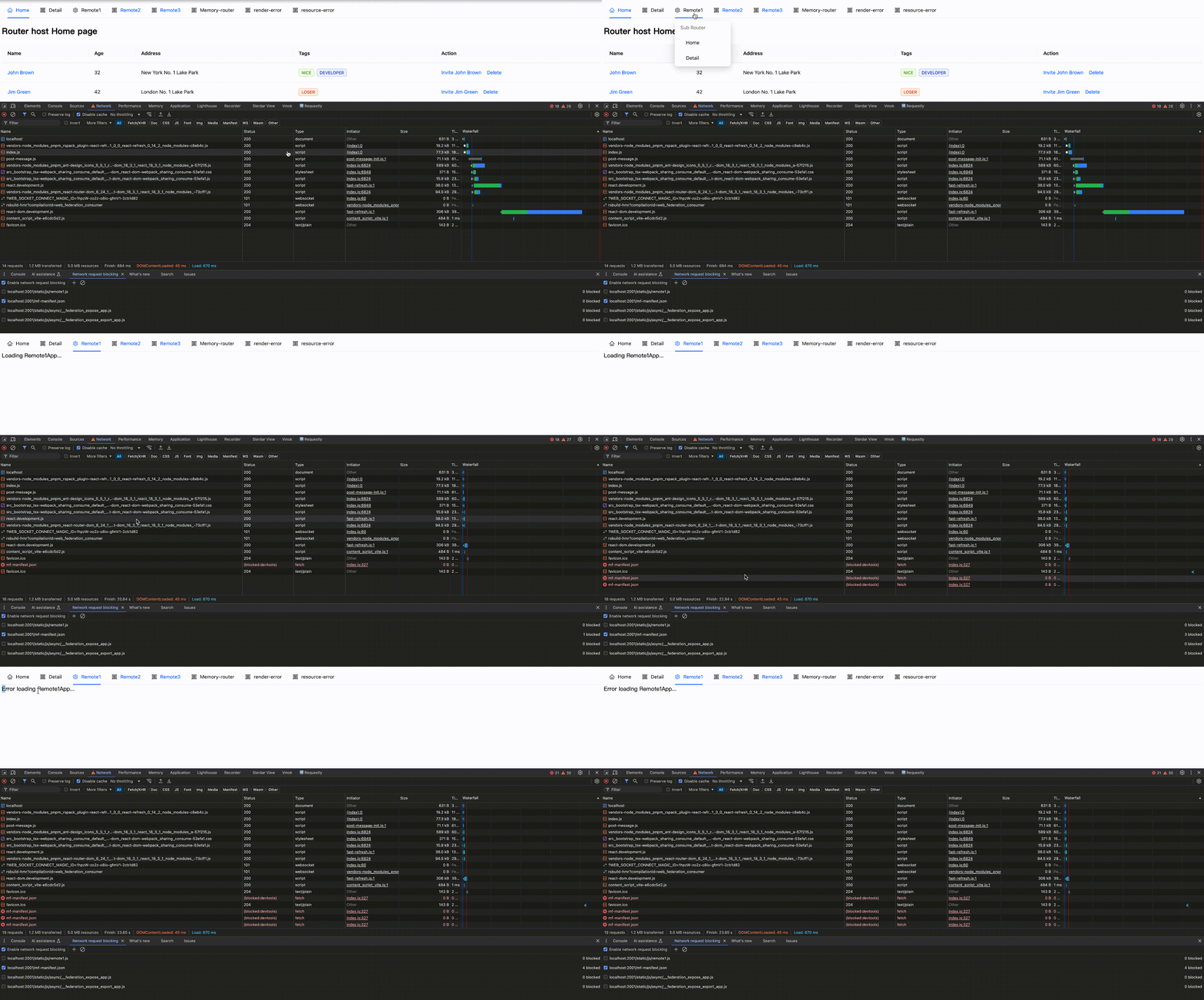
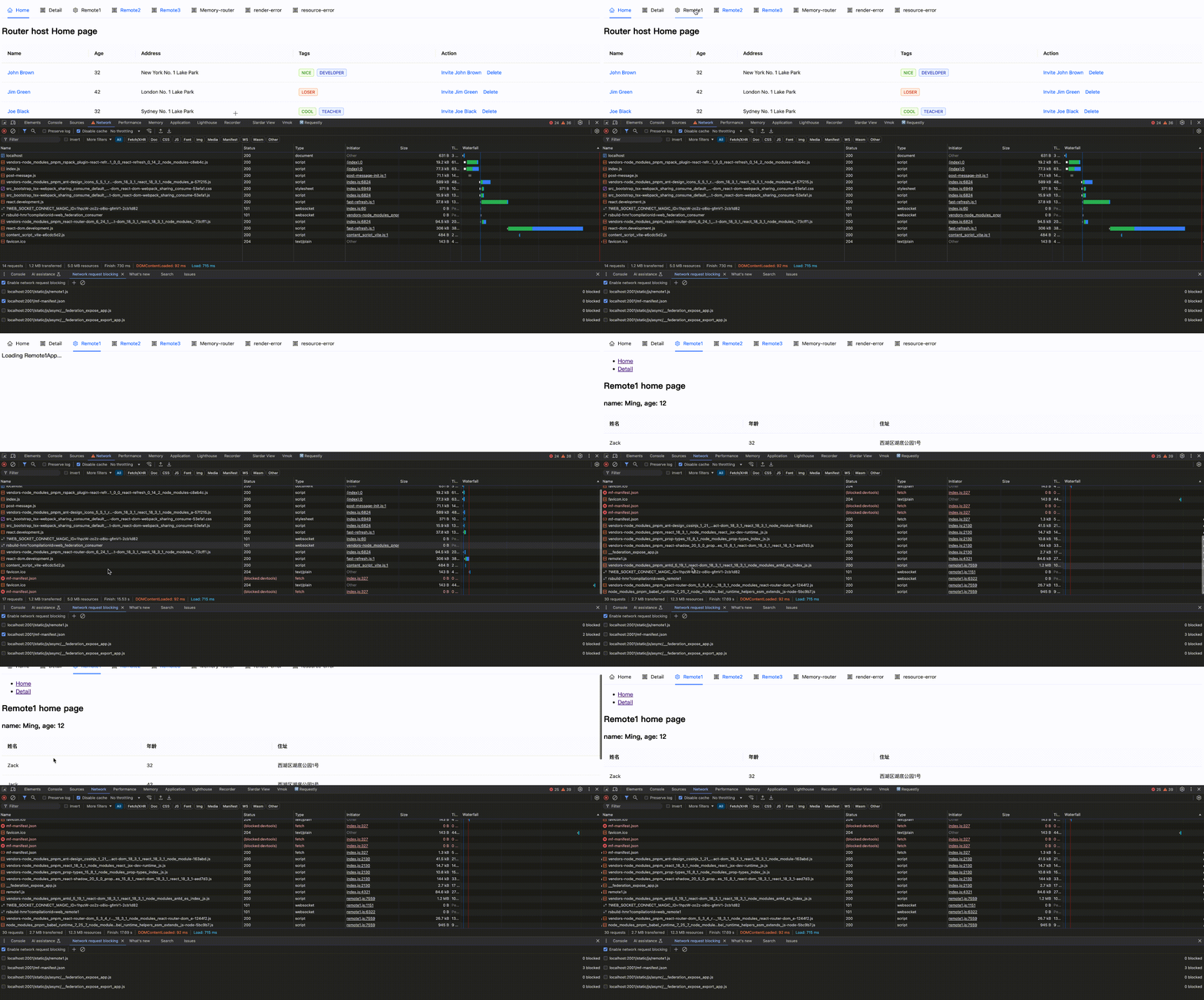 ### errorLoadRemote hook
对于远程模块在加载过程中的错误均可在 [`errorLoadRemote`](https://module-federation.io/zh/plugin/dev/index.html#errorloadremote) hook 中捕获。
`errorLoadRemote` 是 Module Federation Runtime 错误处理的 hook。当远程模块加载失败时,此钩子将被触发。它被设计为在模块加载的各个生命周期阶段失败时触发,并允许用户自定义错误处理策略。
`errorLoadRemote` 支持返回一个兜底组件用户错误兜底,同时也支持返回特定资源内容用于保证后续流程正常渲染。
我们按模块注册和加载用法分为 「纯运行时 + 动态 import」和「插件注册 + 同步 import」。
#### 纯运行时 + 动态 import
纯运行时注册时,远程模块在注册后实际加载前才会请求资源。
```tsx
import React from 'react';
import { createInstance, loadRemote } from '@module-federation/enhanced/runtime';
import { RetryPlugin } from '@module-federation/retry-plugin';
// 模块注册
const mf = createInstance({
name: 'host',
remotes: [
{
name: "remote1",
entry: "http://localhost:2001/mf-manifest.json",
alias: "remote1"
}
],
plugins: [
RetryPlugin({
retryTimes: 3,
retryDelay: 1000,
}),
]
});
// 模块加载
const Remote1Button = React.lazy(() => loadRemote('remote1/button'));
export default () => {
return (
<React.Suspense fallback={<div> Loading Remote1App...</div>}>
<Remote1Button />
</React.Suspense>
);
}
// 方法/函数加载
loadRemote<{add: (...args: Array<number>)=> number }>("remote1/util").then((md)=>{
md.add(1,2,3);
});
```
使用 `errorLoadRemote` hook 来捕获远程模块加载错误(资源加载错误亦包含在内),支持返回 `errorBoundary` 兜底组件。
```tsx
import React from 'react';
import { createInstance, loadRemote } from '@module-federation/enhanced/runtime';
import { RetryPlugin } from '@module-federation/retry-plugin';
const fallbackPlugin: () => ModuleFederationRuntimePlugin = function () {
return {
name: 'fallback-plugin',
errorLoadRemote(args) {
return { default: () => <div> fallback component </div> };
},
};
};
// 模块注册
const mf = createInstance({
name: 'host',
remotes: [
{
name: "remote1",
alias: "remote1"
entry: "http://localhost:2001/mf-manifest.json",
}
],
plugins: [
RetryPlugin({
retryTimes: 3,
retryDelay: 1000,
}),
fallbackPlugin()
]
});
// 模块加载
const Remote1Button = React.lazy(() => mf.loadRemote('remote1/button'));
export default () => {
return (
<React.Suspense fallback={<div> Loading Remote1App...</div>}>
<Remote1Button />
</React.Suspense>
);
}
// 方法/函数加载
mf.loadRemote<{add: (...args: Array<number>)=> number }>("remote1/util").then((md)=>{
md.add(1,2,3);
});
```
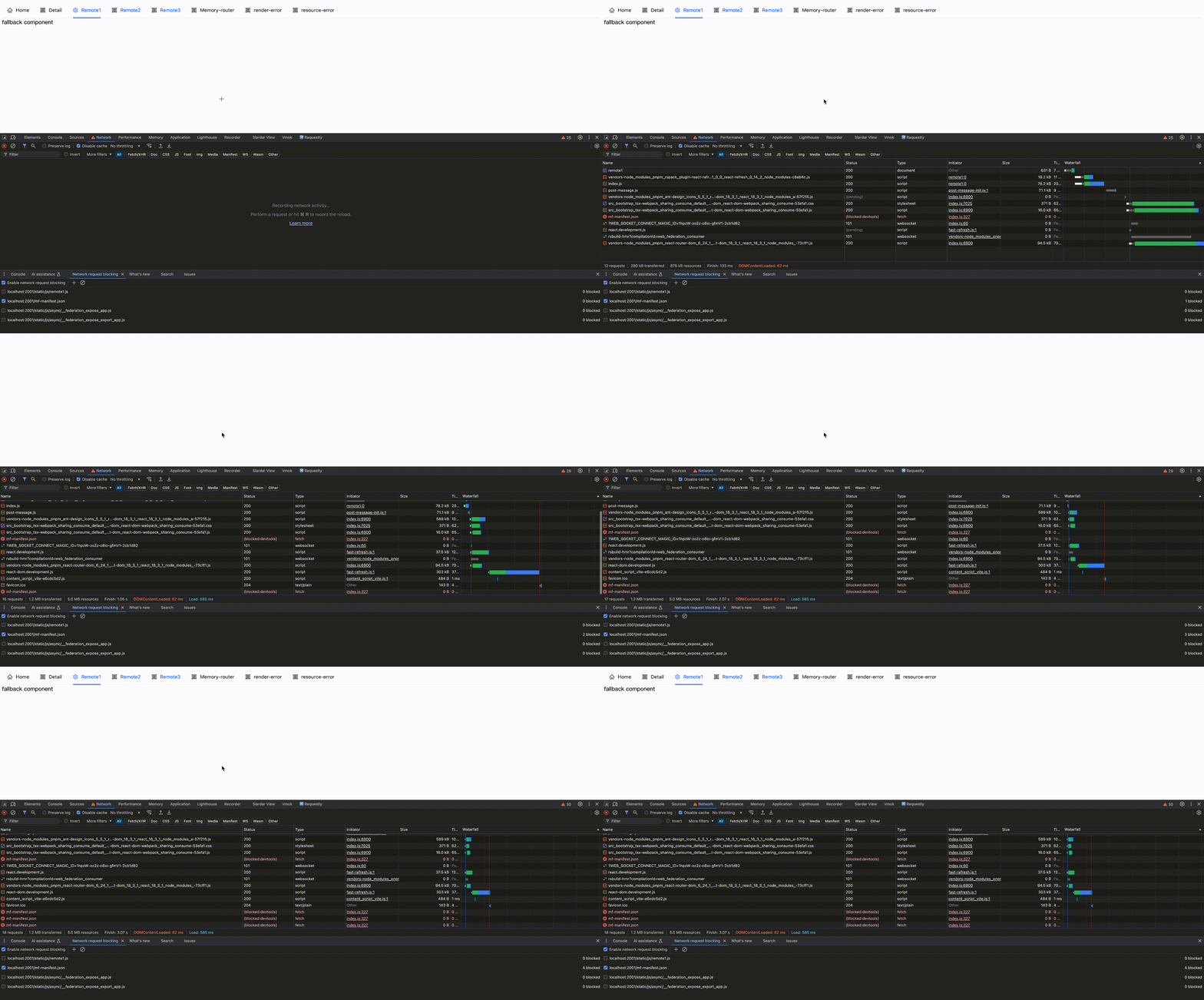
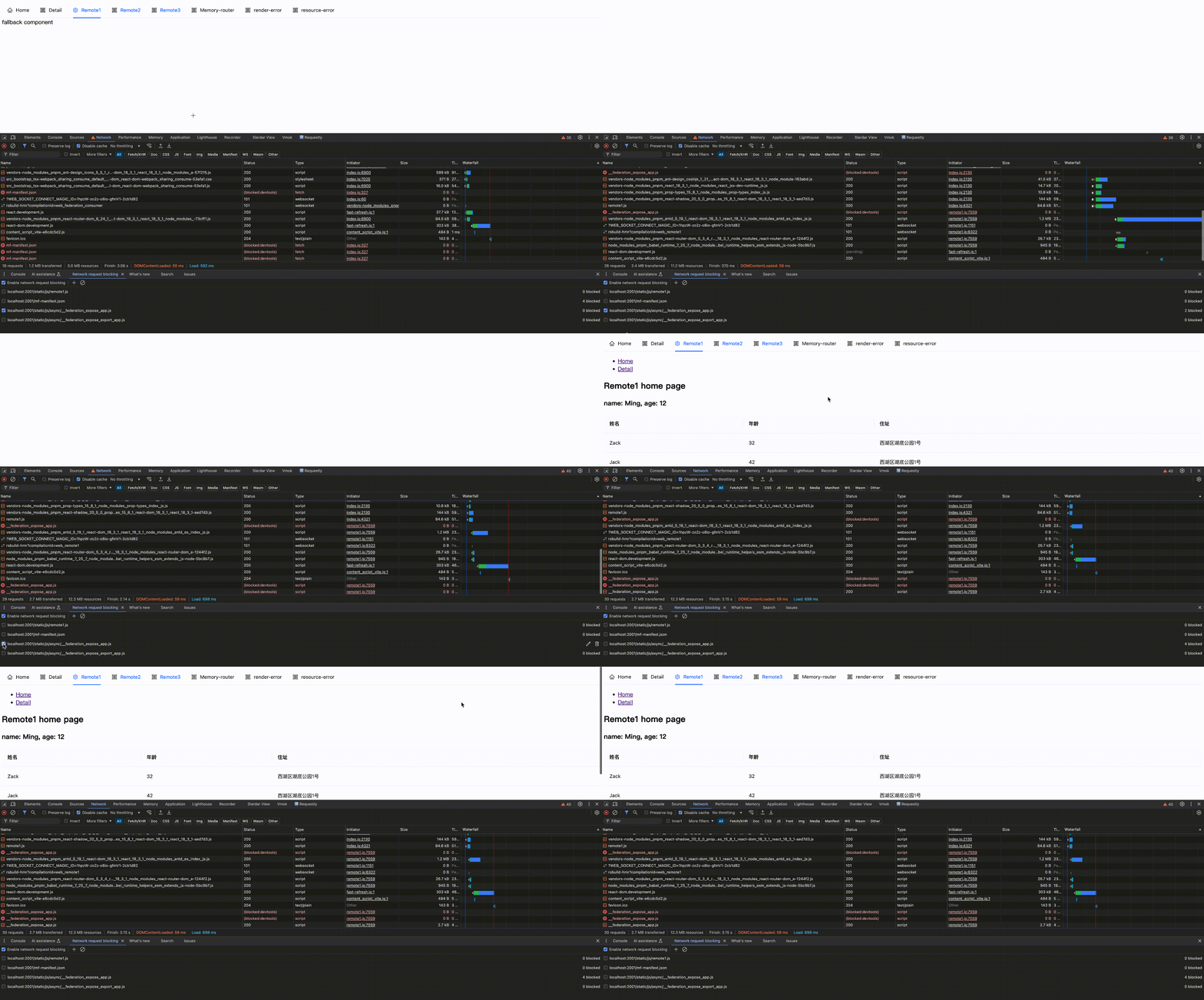
效果如下:
### errorLoadRemote hook
对于远程模块在加载过程中的错误均可在 [`errorLoadRemote`](https://module-federation.io/zh/plugin/dev/index.html#errorloadremote) hook 中捕获。
`errorLoadRemote` 是 Module Federation Runtime 错误处理的 hook。当远程模块加载失败时,此钩子将被触发。它被设计为在模块加载的各个生命周期阶段失败时触发,并允许用户自定义错误处理策略。
`errorLoadRemote` 支持返回一个兜底组件用户错误兜底,同时也支持返回特定资源内容用于保证后续流程正常渲染。
我们按模块注册和加载用法分为 「纯运行时 + 动态 import」和「插件注册 + 同步 import」。
#### 纯运行时 + 动态 import
纯运行时注册时,远程模块在注册后实际加载前才会请求资源。
```tsx
import React from 'react';
import { createInstance, loadRemote } from '@module-federation/enhanced/runtime';
import { RetryPlugin } from '@module-federation/retry-plugin';
// 模块注册
const mf = createInstance({
name: 'host',
remotes: [
{
name: "remote1",
entry: "http://localhost:2001/mf-manifest.json",
alias: "remote1"
}
],
plugins: [
RetryPlugin({
retryTimes: 3,
retryDelay: 1000,
}),
]
});
// 模块加载
const Remote1Button = React.lazy(() => loadRemote('remote1/button'));
export default () => {
return (
<React.Suspense fallback={<div> Loading Remote1App...</div>}>
<Remote1Button />
</React.Suspense>
);
}
// 方法/函数加载
loadRemote<{add: (...args: Array<number>)=> number }>("remote1/util").then((md)=>{
md.add(1,2,3);
});
```
使用 `errorLoadRemote` hook 来捕获远程模块加载错误(资源加载错误亦包含在内),支持返回 `errorBoundary` 兜底组件。
```tsx
import React from 'react';
import { createInstance, loadRemote } from '@module-federation/enhanced/runtime';
import { RetryPlugin } from '@module-federation/retry-plugin';
const fallbackPlugin: () => ModuleFederationRuntimePlugin = function () {
return {
name: 'fallback-plugin',
errorLoadRemote(args) {
return { default: () => <div> fallback component </div> };
},
};
};
// 模块注册
const mf = createInstance({
name: 'host',
remotes: [
{
name: "remote1",
alias: "remote1"
entry: "http://localhost:2001/mf-manifest.json",
}
],
plugins: [
RetryPlugin({
retryTimes: 3,
retryDelay: 1000,
}),
fallbackPlugin()
]
});
// 模块加载
const Remote1Button = React.lazy(() => mf.loadRemote('remote1/button'));
export default () => {
return (
<React.Suspense fallback={<div> Loading Remote1App...</div>}>
<Remote1Button />
</React.Suspense>
);
}
// 方法/函数加载
mf.loadRemote<{add: (...args: Array<number>)=> number }>("remote1/util").then((md)=>{
md.add(1,2,3);
});
```
效果如下:
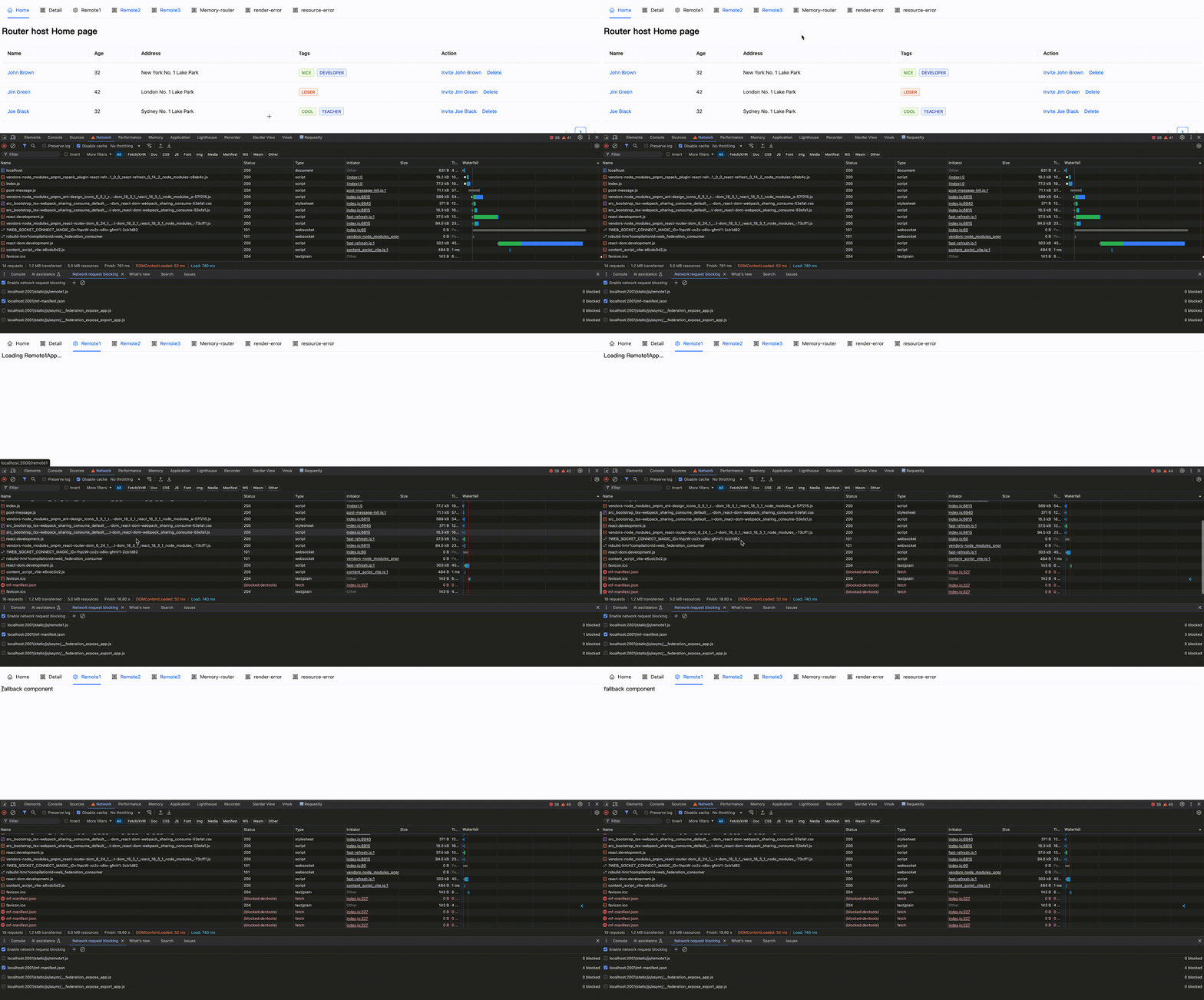
 #### 插件注册 + 同步 import
插件中注册模块支持使用同步 import 加载模块,资源请求时机相较于纯运行时会提前,这时我们需要在插件中注册 `errorLoadRemote` hook.
```tsx
// rsbuild.config.ts
import { pluginModuleFederation } from '@module-federation/rsbuild-plugin';
import { defineConfig } from '@rsbuild/core';
import { pluginReact } from '@rsbuild/plugin-react';
import path from 'path';
export default defineConfig({
plugins: [
pluginReact(),
pluginModuleFederation({
name: 'host',
remotes: {
remote1: 'remote1@http://localhost:2001/mf-manifest.json',
},
runtimePlugins: [
path.join(__dirname, './src/runtime-plugin/retry.ts'),
path.join(__dirname, './src/runtime-plugin/fallback.ts'),
],
...
}),
],
});
```
:::info 提示
下述示例展示了如何根据不同的生命周期阶段精细化处理错误。如果你的应用场景较为简单,不需要区分错误类型,可以参考下方的 **简化版本**,它提供了一个统一的错误处理方案。
:::
```tsx
// src/runtime-plugin/fallback.ts
import type { ModuleFederationRuntimePlugin } from '@module-federation/runtime';
interface FallbackConfig {
// 备用服务地址
backupEntryUrl?: string;
// 自定义错误提示
errorMessage?: string;
}
const fallbackPlugin = (config: FallbackConfig = {}): ModuleFederationRuntimePlugin => {
const {
backupEntryUrl = 'http://localhost:2002/mf-manifest.json',
errorMessage = '模块加载失败,请稍后重试'
} = config;
return {
name: 'fallback-plugin',
async errorLoadRemote(args) {
// 处理组件加载错误
if (args.lifecycle === 'onLoad') {
const React = await import('react');
// 创建一个带有错误提示的兜底组件
const FallbackComponent = React.memo(() => {
return React.createElement(
'div',
{
style: {
padding: '16px',
border: '1px solid #ffa39e',
borderRadius: '4px',
backgroundColor: '#fff1f0',
color: '#cf1322'
}
},
errorMessage
);
});
FallbackComponent.displayName = 'ErrorFallbackComponent';
return () => ({
__esModule: true,
default: FallbackComponent
});
}
// 处理入口文件加载错误
if (args.lifecycle === 'afterResolve') {
try {
// 尝试加载备用服务
const response = await fetch(backupEntryUrl);
if (!response.ok) {
throw new Error(`Failed to fetch backup entry: ${response.statusText}`);
}
const backupManifest = await response.json();
console.info('Successfully loaded backup manifest');
return backupManifest;
} catch (error) {
console.error('Failed to load backup manifest:', error);
// 如果备用服务也失败,返回原始错误
return args;
}
}
return args;
},
};
};
export default fallbackPlugin;
```
- `App.tsx` 同步导入:`import Remote1App from 'remote1/app';`
- 关于 `fallback.ts`:
- `errorLoadRemote` 钩子接收一个 `args` 参数,其中包含了错误的详细信息。通过 `args.lifecycle` 我们可以判断错误发生的阶段,从而采取相应的处理策略:
- **处理组件加载错误** (`args.lifecycle === 'onLoad'`)
- 这类错误发生在除入口资源 `mf-manifest.json` 外的模块加载过程中
- 我们可以返回一个带有样式的兜底组件:
```ts
if (args.lifecycle === 'onLoad') {
const React = await import('react');
const FallbackComponent = React.memo(() => {
return React.createElement(
'div',
{
style: {
padding: '16px',
border: '1px solid #ffa39e',
borderRadius: '4px',
backgroundColor: '#fff1f0',
color: '#cf1322'
}
},
'fallback component'
);
});
FallbackComponent.displayName = 'ErrorFallbackComponent';
return () => ({
__esModule: true,
default: FallbackComponent
});
}
```
- **处理入口文件错误** (`args.lifecycle === 'afterResolve'`)
- 这类错误发生在入口资源 `mf-manifest.json` 加载过程中
- 可以通过以下两种方式处理:
a. 尝试加载备用服务:
```ts
if (args.lifecycle === 'afterResolve') {
try {
const response = await fetch('http://localhost:2002/mf-manifest.json');
if (!response.ok) {
throw new Error(`Failed to fetch backup entry: ${response.statusText}`);
}
const backupManifest = await response.json();
console.info('Successfully loaded backup manifest');
return backupManifest;
} catch (error) {
console.error('Failed to load backup manifest:', error);
return args;
}
}
```
b. 使用本地备用资源:
```ts
if (args.lifecycle === 'afterResolve') {
// 使用预定义的备用清单
const backupManifest = {
id: 'fallback',
name: 'fallback',
metaData: {
name: 'fallback',
type: 'app',
buildInfo: {
buildVersion: 'local',
buildName: 'fallback',
},
remoteEntry: {
name: 'remoteEntry.js',
path: '',
type: 'global',
},
types: {
path: '',
name: '',
zip: '@mf-types.zip',
api: '@mf-types.d.ts',
},
globalName: 'fallback',
pluginVersion: '1',
prefetchInterface: false,
publicPath: 'https://example.com/',
},
shared: [],
remotes: [],
exposes: [],
};
return backupManifest;
}
```
- **简化版本**
如果不需要区分错误类型,也可以使用一个通用的错误处理方案:
```ts
import type { ModuleFederationRuntimePlugin } from '@module-federation/runtime';
const fallbackPlugin = (errorMessage = '模块加载失败,请稍后重试'): ModuleFederationRuntimePlugin => {
return {
name: 'fallback-plugin',
async errorLoadRemote() {
const React = await import('react');
const FallbackComponent = React.memo(() => {
return React.createElement(
'div',
{
style: {
padding: '16px',
border: '1px solid #ffa39e',
borderRadius: '4px',
backgroundColor: '#fff1f0',
color: '#cf1322'
}
},
errorMessage
);
});
FallbackComponent.displayName = 'ErrorFallbackComponent';
return () => ({
__esModule: true,
default: FallbackComponent
});
},
};
};
export default fallbackPlugin;
```
效果如下:
#### 插件注册 + 同步 import
插件中注册模块支持使用同步 import 加载模块,资源请求时机相较于纯运行时会提前,这时我们需要在插件中注册 `errorLoadRemote` hook.
```tsx
// rsbuild.config.ts
import { pluginModuleFederation } from '@module-federation/rsbuild-plugin';
import { defineConfig } from '@rsbuild/core';
import { pluginReact } from '@rsbuild/plugin-react';
import path from 'path';
export default defineConfig({
plugins: [
pluginReact(),
pluginModuleFederation({
name: 'host',
remotes: {
remote1: 'remote1@http://localhost:2001/mf-manifest.json',
},
runtimePlugins: [
path.join(__dirname, './src/runtime-plugin/retry.ts'),
path.join(__dirname, './src/runtime-plugin/fallback.ts'),
],
...
}),
],
});
```
:::info 提示
下述示例展示了如何根据不同的生命周期阶段精细化处理错误。如果你的应用场景较为简单,不需要区分错误类型,可以参考下方的 **简化版本**,它提供了一个统一的错误处理方案。
:::
```tsx
// src/runtime-plugin/fallback.ts
import type { ModuleFederationRuntimePlugin } from '@module-federation/runtime';
interface FallbackConfig {
// 备用服务地址
backupEntryUrl?: string;
// 自定义错误提示
errorMessage?: string;
}
const fallbackPlugin = (config: FallbackConfig = {}): ModuleFederationRuntimePlugin => {
const {
backupEntryUrl = 'http://localhost:2002/mf-manifest.json',
errorMessage = '模块加载失败,请稍后重试'
} = config;
return {
name: 'fallback-plugin',
async errorLoadRemote(args) {
// 处理组件加载错误
if (args.lifecycle === 'onLoad') {
const React = await import('react');
// 创建一个带有错误提示的兜底组件
const FallbackComponent = React.memo(() => {
return React.createElement(
'div',
{
style: {
padding: '16px',
border: '1px solid #ffa39e',
borderRadius: '4px',
backgroundColor: '#fff1f0',
color: '#cf1322'
}
},
errorMessage
);
});
FallbackComponent.displayName = 'ErrorFallbackComponent';
return () => ({
__esModule: true,
default: FallbackComponent
});
}
// 处理入口文件加载错误
if (args.lifecycle === 'afterResolve') {
try {
// 尝试加载备用服务
const response = await fetch(backupEntryUrl);
if (!response.ok) {
throw new Error(`Failed to fetch backup entry: ${response.statusText}`);
}
const backupManifest = await response.json();
console.info('Successfully loaded backup manifest');
return backupManifest;
} catch (error) {
console.error('Failed to load backup manifest:', error);
// 如果备用服务也失败,返回原始错误
return args;
}
}
return args;
},
};
};
export default fallbackPlugin;
```
- `App.tsx` 同步导入:`import Remote1App from 'remote1/app';`
- 关于 `fallback.ts`:
- `errorLoadRemote` 钩子接收一个 `args` 参数,其中包含了错误的详细信息。通过 `args.lifecycle` 我们可以判断错误发生的阶段,从而采取相应的处理策略:
- **处理组件加载错误** (`args.lifecycle === 'onLoad'`)
- 这类错误发生在除入口资源 `mf-manifest.json` 外的模块加载过程中
- 我们可以返回一个带有样式的兜底组件:
```ts
if (args.lifecycle === 'onLoad') {
const React = await import('react');
const FallbackComponent = React.memo(() => {
return React.createElement(
'div',
{
style: {
padding: '16px',
border: '1px solid #ffa39e',
borderRadius: '4px',
backgroundColor: '#fff1f0',
color: '#cf1322'
}
},
'fallback component'
);
});
FallbackComponent.displayName = 'ErrorFallbackComponent';
return () => ({
__esModule: true,
default: FallbackComponent
});
}
```
- **处理入口文件错误** (`args.lifecycle === 'afterResolve'`)
- 这类错误发生在入口资源 `mf-manifest.json` 加载过程中
- 可以通过以下两种方式处理:
a. 尝试加载备用服务:
```ts
if (args.lifecycle === 'afterResolve') {
try {
const response = await fetch('http://localhost:2002/mf-manifest.json');
if (!response.ok) {
throw new Error(`Failed to fetch backup entry: ${response.statusText}`);
}
const backupManifest = await response.json();
console.info('Successfully loaded backup manifest');
return backupManifest;
} catch (error) {
console.error('Failed to load backup manifest:', error);
return args;
}
}
```
b. 使用本地备用资源:
```ts
if (args.lifecycle === 'afterResolve') {
// 使用预定义的备用清单
const backupManifest = {
id: 'fallback',
name: 'fallback',
metaData: {
name: 'fallback',
type: 'app',
buildInfo: {
buildVersion: 'local',
buildName: 'fallback',
},
remoteEntry: {
name: 'remoteEntry.js',
path: '',
type: 'global',
},
types: {
path: '',
name: '',
zip: '@mf-types.zip',
api: '@mf-types.d.ts',
},
globalName: 'fallback',
pluginVersion: '1',
prefetchInterface: false,
publicPath: 'https://example.com/',
},
shared: [],
remotes: [],
exposes: [],
};
return backupManifest;
}
```
- **简化版本**
如果不需要区分错误类型,也可以使用一个通用的错误处理方案:
```ts
import type { ModuleFederationRuntimePlugin } from '@module-federation/runtime';
const fallbackPlugin = (errorMessage = '模块加载失败,请稍后重试'): ModuleFederationRuntimePlugin => {
return {
name: 'fallback-plugin',
async errorLoadRemote() {
const React = await import('react');
const FallbackComponent = React.memo(() => {
return React.createElement(
'div',
{
style: {
padding: '16px',
border: '1px solid #ffa39e',
borderRadius: '4px',
backgroundColor: '#fff1f0',
color: '#cf1322'
}
},
errorMessage
);
});
FallbackComponent.displayName = 'ErrorFallbackComponent';
return () => ({
__esModule: true,
default: FallbackComponent
});
},
};
};
export default fallbackPlugin;
```
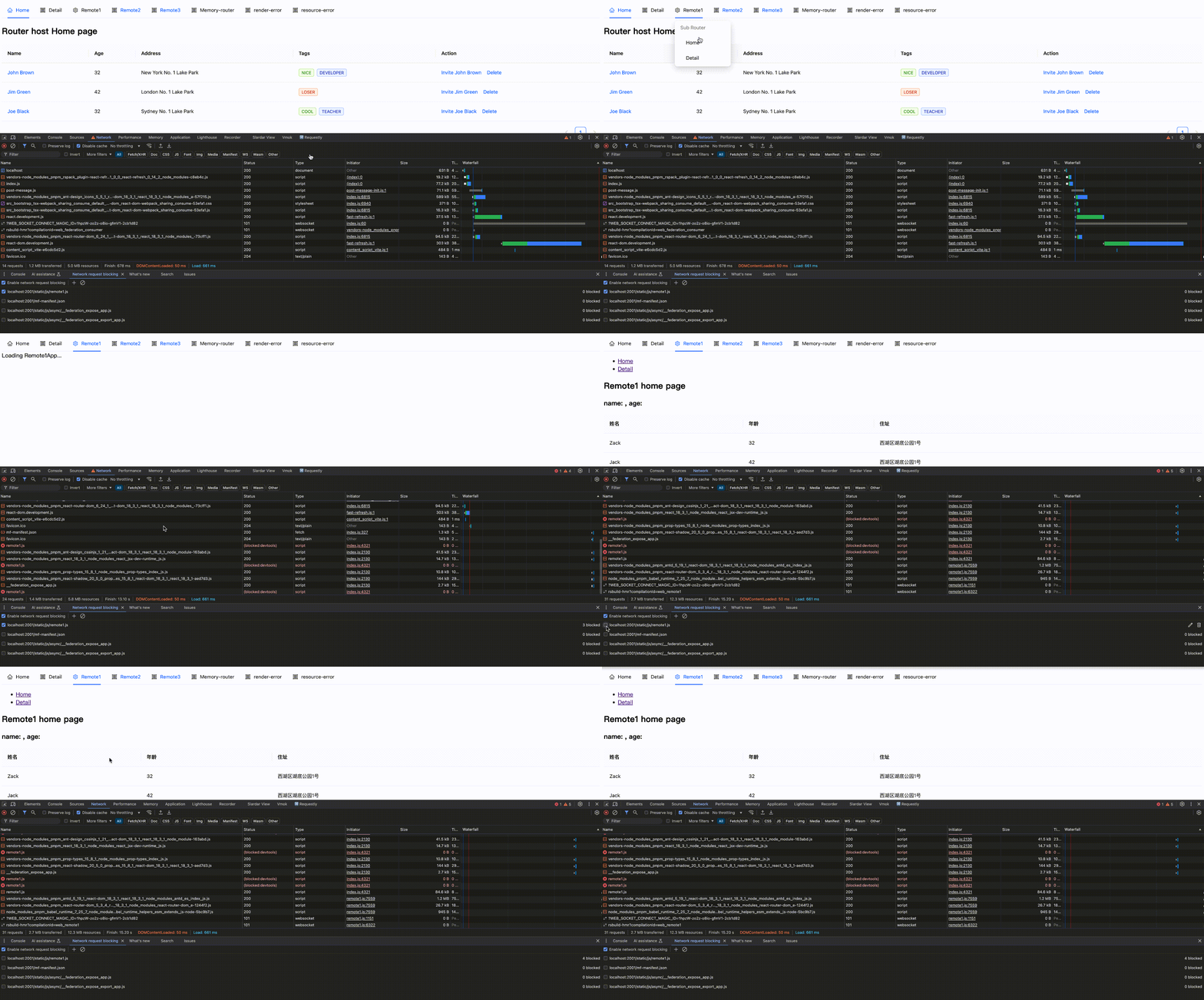
效果如下:
 ### 为组件设置 ErrorBoundary
React 的 ErrorBoundary 是处理组件级错误的最后一道防线,在远程模块的动态加载场景中(如懒加载),它可以帮助我们捕获和处理远程模块的渲染错误并提供优雅的降级处理。
为组件设置 ErrorBoundary 适用于动态导入远程模块场景,例如 懒加载场景。
此外,在为组件自身设置 ErrorBoundary 后你可以不依赖 errorLoadRemote hook 来进行错误兜底,这是利用 React 自身的特性来为你的组件进行错误兜底。
- `App.tsx` 动态导入远程模块
```tsx
// App.tsx
import React, {
useRef,
useEffect,
ForwardRefExoticComponent,
Suspense,
} from 'react';
const Remote1AppWithLoadRemote = React.lazy(() => loadRemote('remote1/app'));
const Remote1AppWithErrorBoundary = React.forwardRef<any, any>((props, ref) => (
<ErrorBoundary fallback={<div>Error loading Remote1App...</div>}>
<Suspense fallback={<div> Loading Remote1App...</div>}>
<Remote1AppWithLoadRemote {...props} ref={ref} />
</Suspense>
</ErrorBoundary>
));
export default function App() {
return (
<>
<div className="flex flex-row">
<h2>Remote1</h2>
<Remote1AppWithErrorBoundary />
</div>
</>
);
}
```
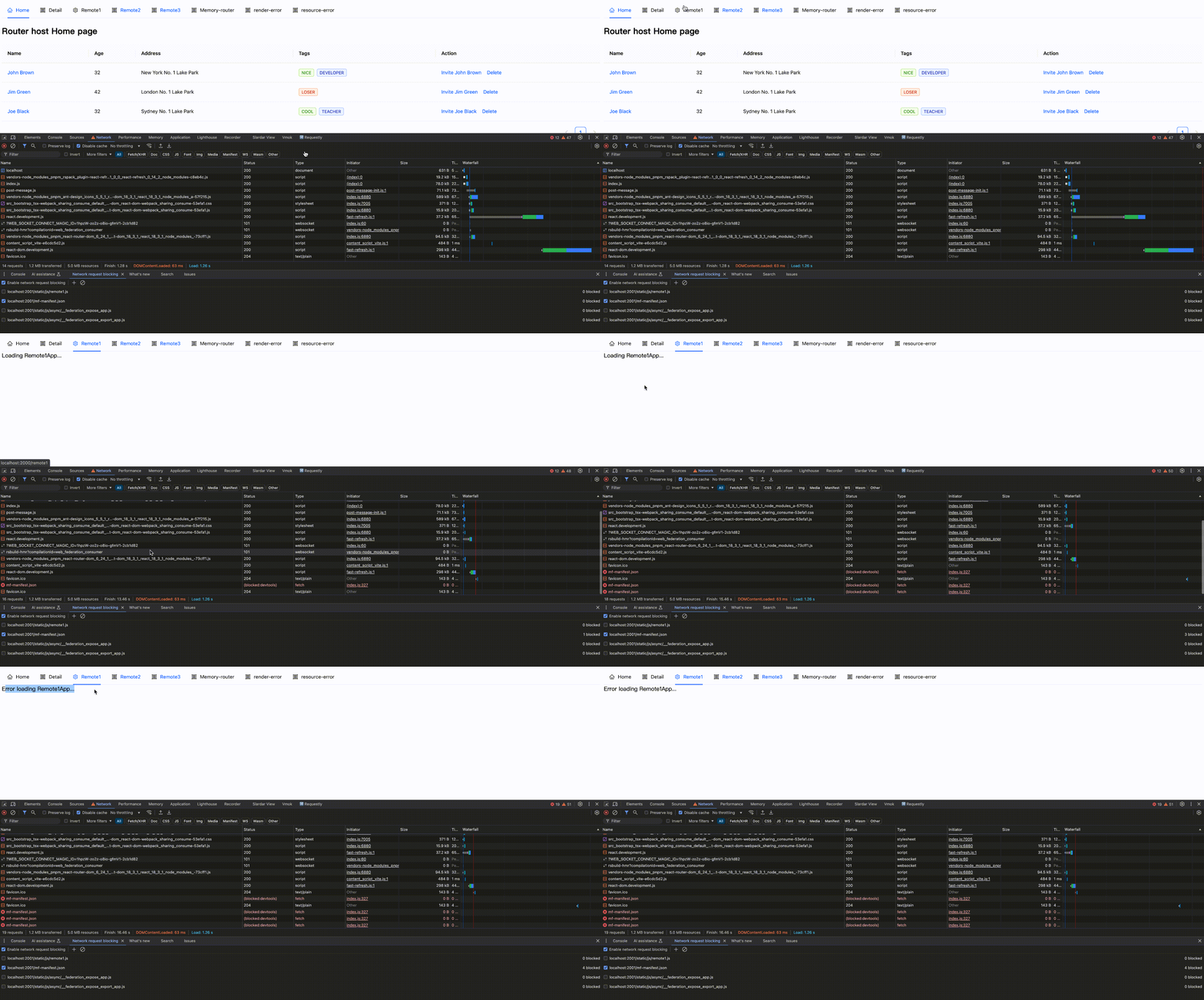
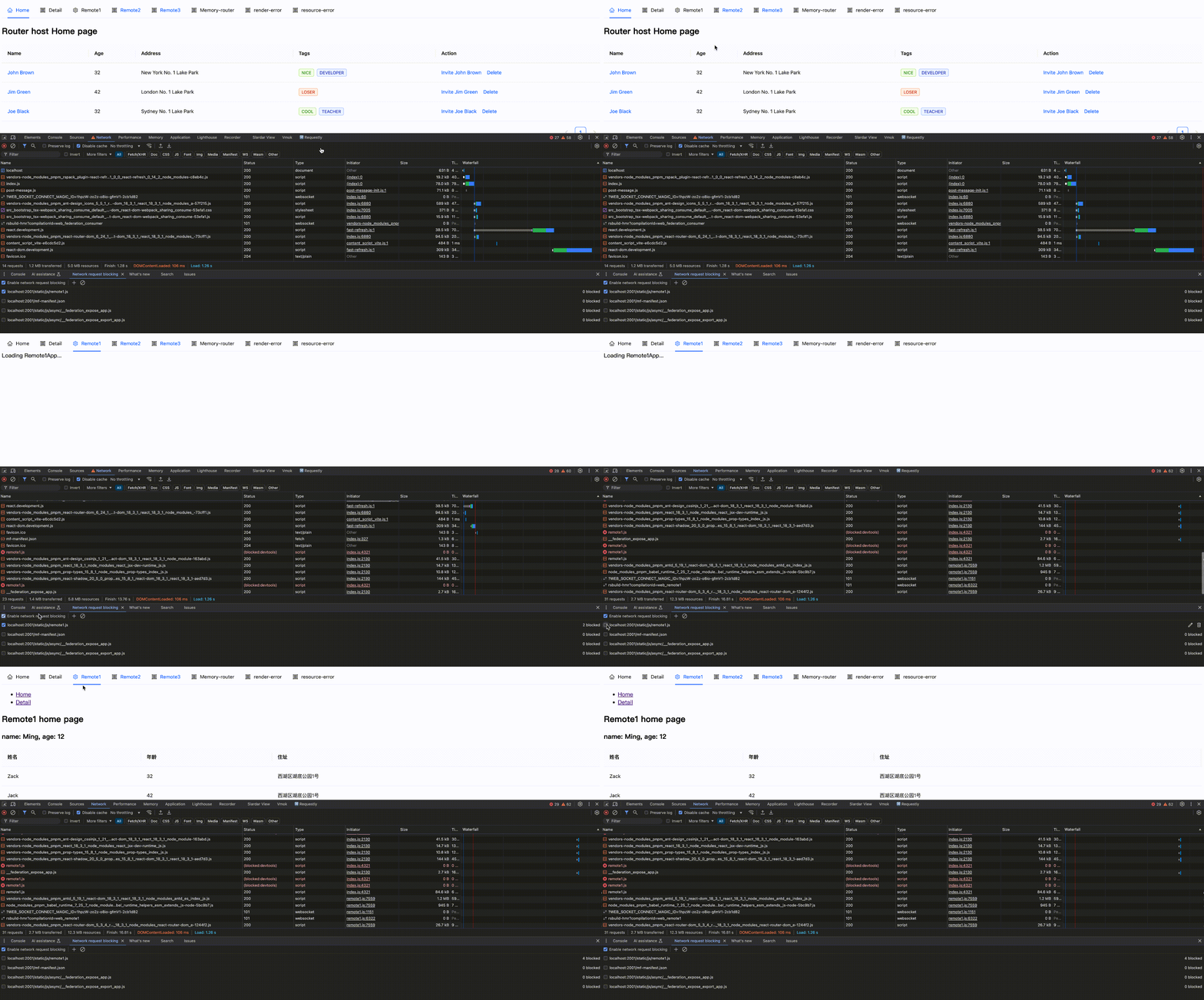
效果如下:
### 为组件设置 ErrorBoundary
React 的 ErrorBoundary 是处理组件级错误的最后一道防线,在远程模块的动态加载场景中(如懒加载),它可以帮助我们捕获和处理远程模块的渲染错误并提供优雅的降级处理。
为组件设置 ErrorBoundary 适用于动态导入远程模块场景,例如 懒加载场景。
此外,在为组件自身设置 ErrorBoundary 后你可以不依赖 errorLoadRemote hook 来进行错误兜底,这是利用 React 自身的特性来为你的组件进行错误兜底。
- `App.tsx` 动态导入远程模块
```tsx
// App.tsx
import React, {
useRef,
useEffect,
ForwardRefExoticComponent,
Suspense,
} from 'react';
const Remote1AppWithLoadRemote = React.lazy(() => loadRemote('remote1/app'));
const Remote1AppWithErrorBoundary = React.forwardRef<any, any>((props, ref) => (
<ErrorBoundary fallback={<div>Error loading Remote1App...</div>}>
<Suspense fallback={<div> Loading Remote1App...</div>}>
<Remote1AppWithLoadRemote {...props} ref={ref} />
</Suspense>
</ErrorBoundary>
));
export default function App() {
return (
<>
<div className="flex flex-row">
<h2>Remote1</h2>
<Remote1AppWithErrorBoundary />
</div>
</>
);
}
```
效果如下:
Block 网络请求
Block 后又 Enable
Block 网络请求
Block 后又 Enable
Block 网络请求
Block 后又 Enable
Block 网络请求
Block 后又 Enable